

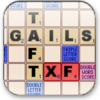
Faithful digital adaptation of the classic word board game, offering family fun but limited dictionary
Faithful digital adaptation of the classic word board game, offering family fun but limited dictionary
Scrabble download. Always available from trusted servers.
- Free & fast downloader (more info)
- Always available
- Tested virus-free
Popular programs in Pastimes



What is Scrabble
The Scrabble PC game takes the hard work out of setting up your game board and lets you enjoy the freedom of playing with loved ones or against the computer. As with the traditional game, you receive seven letters when you start the game. You or one of your competitors must make a move and spell a word in the center of the board. Each time you use your letters, the game will automatically give you new tile letters. You earn points for spelling new words, with additional points rewarded for laying your tiles on certain letters on the board.
While the PC game uses some of the same elements found in the board game, you'll also find a host of new and exciting features. A large button on the bottom left hand side of the screen lets you get help when you need it. The shuffle button lets you shuffle the letters in your rack. Shuffling gives you a clear head and might help you find words you didn't notice before. The exchange button lets you trade in one or more letters to get new tiles. With the hint button, the computer will give you a possible word that you can spell based on the tiles you currently have.
If you have ever played Scrabble before, you know the problems that occur when one person spells a unique or unusual word. Instead of reaching for the dictionary, you can use the computer to determine the validity of each word. The computer will automatically detect any misspelled words or words not available in the dictionary that users play. This new and great feature cuts down on the fights that might otherwise break out amongst players.
With the Scrabble board game, your letter tiles always go exactly where you want those tiles to go. The computer version of that game doesn't always respond as well as you might hope. Some players find that they can't drag their tiles to the right squares on the board, and other players find that the game won't let them adjust those tiles once they make a move.
This game comes with a difficulty setting that lets you increase or decrease the skill level of your computerized competitor. The easiest setting is a great way to get kids excited about spelling and learning new words, but you'll love playing the computer on the higher difficulty settings. If you love the board game, you'll love the PC game too.
Pros
- Several difficulty levels let you adjust the settings to play against the computer based on your level.
- Great graphics bring the ordinary board game to life on your computer.
- Multiple buttons let you get help in the form of a hint, exchange your tiles, or shuffle your tiles.
Cons
- Difficult to play with multiple players.
- Slow response time leaves the game lagging after you place your tiles on the board.
- Dragging and placing the tiles is difficult and can result in tiles landing in other squares on the board.